

Information PKI/Certificates
Table of contents
PKI and digital certificates
PLEASE NOTE:
The scope of the UniKassel certificates is limited to the University of Kassel and its employees, students and the domain "uni-kassel.de" and its subdomains.
Why do you need certificates?
A digital certificate is to a certain extent the equivalent of an ID card and is used to assign a specific public key to a person or organization. This assignment is authenticated by the certification authority by adding its own digital signature. The certificates contain private and public keys and additional information that is used for authentication and for encrypting and decrypting confidential data. The private key remains with the user and must never be disclosed.
User certificates
User certificates are personal certificates with which users can uniquely identify themselves. These certificates can be used in many email programs and browsers, e.g. for signing and encrypting emails.
Server certificates
Server certificates are used to identify a specific server. This means that the server must also "identify" itself to the users and prove that it really is the server it claims to be.
Validity of the certificate
In the case of a valid certificate, the following must apply
- The full domain name (e.g. www.uni-kassel.de) must match the domain name stated in the certificate.
- Access must take place within the validity period, i.e. the certificate must not have expired.
- The certificate chain must be complete and end with a root certificate that is trusted. If a certificate is missing from the chain, a certificate cannot be verified.
- Check whether the certificate has been revoked. This is done by checking whether the certificate is on the revocation list of the certification authority.
What is a root certificate?
At the top of the hierarchy/chain of certificates is a top-level certificate. Root certificates must be installed in the application programs (e.g. in your browser) so that the application programs can check the hierarchy/chain of certificates. Most application programs already come with pre-integrated root certificates for commercial certification instances. In future, this will also be possible for root certificates of the DFN-PCA.
However, you should only import/install root certificates if you trust the corresponding certification authority. With the pre-integrated root certificates, you no longer have this freedom of choice.
Import root certificates
Importing the root certificates is a mandatory process so that the validity and trustworthiness of the certificates can be checked.
Instructions for integrating the root certificates for various operating systems can be found under Certificates for WLAN/VPN use.
Why must certificate warnings be taken seriously?
Almost everyone has probably seen a certificate warning at some point. If there is a warning message from the web browser, it is an attempt at fraud or a misconfiguration of the server or your web browser. In either case, you should look for the cause of the warning. Never enter confidential information such as passwords or account information! If necessary, ask the ITS or your system administrator.
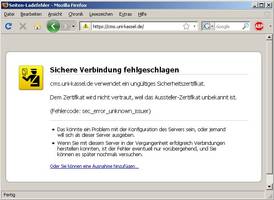
Typical warning messages concern:
- The certificate has expired, i.e. the validity period has expired.
- The certificate is issued for a different web server, e.g. www.xyz.de presents a certificate from www.abc.de.
- The certificate is self-signed, i.e. the owner of the certificate has signed it himself. Such certificates are at best suitable for test purposes.
- The certificate has been revoked.
- The certification authority that issued the certificate is not known to the browser. This may mean that a root certificate is missing in order to check the certificate chain. However, it could also be an attempt at fraud.
In any case, you should read the certificate warning, as it usually provides a good indication of the cause.
Further information can be found on the DFN-Verein website [external].