

Unlock access to the Creative Cloud
The Creative Cloud can only be used via the UniAccount. In addition to your e-mail address, your first and last name will be transmitted to Adobe for the duration of use.
To use the Adobe campus license, you need a personal Adobe ID. Please note that it is necessary that the preferred e-mail address in identity management ends with "@uni-kassel.de" or "@student.uni-kassel.de". You can find instructions on how to set up the preferred e-mail address under"Set preferred e-mail address".
To apply for the personal Adobe ID, follow the steps below:
Log in with your primary account at < https://www.uni-kassel.de/go/userapp > and click on "Request access".
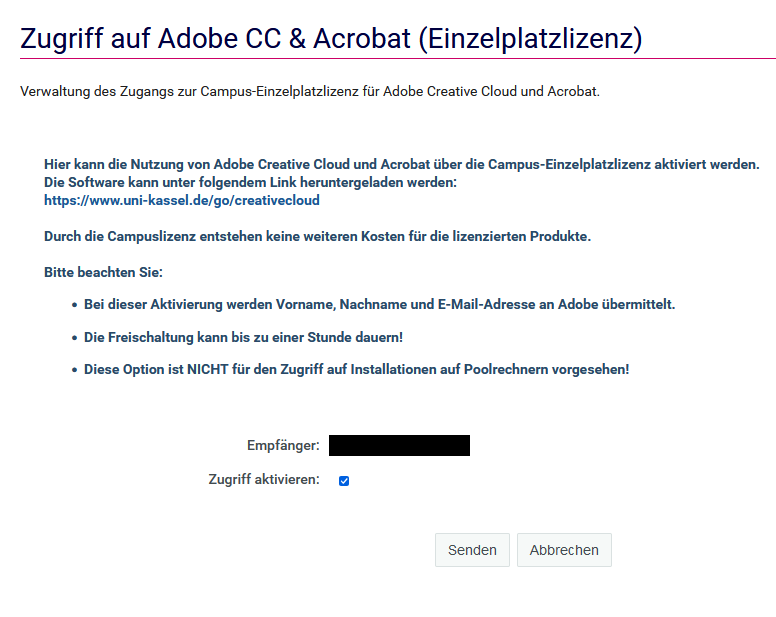
Then scroll to the "Services" tab and click on "Access Adobe CC & Acrobat".
A new browser window will open.

If nothing happens after clicking on "Access Adobe CC & Acrobat", your web browser is probably blocking the pop-up window that should actually open. Please make sure that your web browser allows the opening of pop-up windows for userapp.its.uni-kassel.de.
In Mozilla Firefox, for example, you will see a message and an option to allow the pop-up window directly below the address bar.
Agree to the terms of use by checking the box "Activate access". Then click on "Send".
Please note that it may take up to two hours to activate access to the Creative Cloud. You will receive a confirmation email when it is ready.
Go-Link of this page: https://www.uni-kassel.de/go/creative-cloud-zugriff