

Software of the cluster
Access to the cluster software is via the module system. To display graphical user interfaces, you need an "X11 forwarding". Read the chapter Starting programs interactively. The following software is installed on the cluster:
Abaqus
- Version 6.12-3
- Official website
Interactive working with Abaqus in the Linux cluster:
| uk00123@its-cs1:/home/users/000/uk00123> salloc -N1 -t 1:00:00 salloc: Granted job allocation 5404733 uk00123@its-cs1:/home/users/000/uk00123> srun xterm |
To display the graphical user interface, an SSH connection with X11 forwarding is required.
A node is requested with salloc for one hour and then a terminal is started on the assigned node with srun xterm. You can now work interactively in the terminal with the abaqus command.
The graphical interface of Abaqus is started with abaqus cae -mesa. This can lead to a semi-transparent display of the GUI. The following variable can be set before the abaqus command in the xterm terminal to remedy this:
| export XLIB_SKIP_ARGB_VISUALS=1 && abaqus cae -mesa |
SubmitScript for Abaqus:
In order for an Abaqus job to run without errors in the batch system, the command
| unset SLURM_GTIDS |
must be inserted before calling Abaqus, otherwise an error "abaqus illegal memory reference (signal 11)" may occur.
ACML 4.1.0
The use of the AMD Core Math Library is recommended for optimizing vector-based calculations. This combines libraries for
- highly optimized BLAS (Basic Linear Algebra Subroutines)
- LAPACK (Linear Algebra Pack)
- FFT (Fast Fourier Transforms)
The software is available on all machines of the cluster for the respective compiler ($compiler) under
/opt/acml/$compiler
CalculiX
CalculiX is a finite element program for the simulation of three-dimensional flow processes.
- Version: 2.5
- License: GNU Genereal Public License
- Official website
- Documentation(ccx_2.5 and cgx_2.5 )
| cgx_2.5 -b examples/compressor/lavff.fbd |
To use the graphical user interface, you must use an X11 redirect.
DALTON and LSDALTON
- Version. 2013.0
- Official website
To use the software, please send the signed and scanned license agreement by e-mail. You will then be given access to the software.
Erlang/OTP
- Version 18.0
- Official website
- License: APL 2.0 (Apache Public License)
Erlang is used for concurrent, distributed and parallel programming and is available in version 18.0 on the Linux cluster.
To use the module, the following command must be executed:
module load erlang/18.0 |
jrMan
jrMan is an open-source Java implementation of the RenderMan standard (Reyes algorithm). To use jrMan, environment variables must be adapted. This is done in the Kornshell (ksh) with the command:
module load jrman |
(RenderMan (R) Interface Procedures and RIB Protocol: Copyright 1988, 1989, Pixar.)
Matlab
- Version R2017a
- License: 13 academic licenses (Matlab, Simulink, Symbolic Math) - in future campus license
- Toolboxes: Optimization Toolbox (3 licenses), Statistics Toolbox (2 licenses)
- Official website
Mathematica
The mathematical and scientific program package Mathematica is installed on all machines in the Linux cluster.
- Licenses: 10
- Version: 12.0
- Official website
Working with Mathematica in the Linux cluster:
uk00123@its-cs1:/home/users/000/uk00123> salloc -N1 -t 1:00:00 |
A computer system is requested for one hour. The graphical user interface is then started with srun Mathematica. For batch operation, Mathematica is started by calling math in command line mode. Further information is available via man math (mcc, mathematica) .
Maple
The computer algebra system Maple is installed on all machines in the Linux cluster. Maple is used in algebra, analysis, discrete mathematics and numerics. Maple offers programming interfaces and visualization of mathematical structures.
- Licenses: 10
- Version: 2020
- Official website
Working with Maple in the Linux cluster with graphical user interface:
uk00123@its-cs1:/home/users/000/uk00123> salloc -N1 -t 1:00:00 |
The call reserves a computer system in the Linux cluster for a period of 1 hour and starts the Maple graphical environment on the reserved system. For batch operation, Maple is started via the maple call in command line mode. Further information is available via man maple .
OpenFOAM
OpenFOAM is a software for solving problems in continuum mechanics.
- Version: 5.0
- License: GNU GENERAL PUBLIC LICENSE, Version 3
- Official website
- UserGuide
Working with OpenFOAM in the Linux cluster:
uk00123@its-cs1:/home/users/000/uk00123> module load openfoam |
The environment variables for working with OpenFOAM are set with the module load openfoam command. A computer system is then requested for one hour with srun and an Xterm is started there. OpenFOAM is used in the Xterm.
Example:
uk000123@its-cs1:/home/users/000/uk000123> mkdir OpenFOAM |
Pixie-2.2.4
Pixie is an open-source implementation of the RenderMan standard for creating photorealistic images. RenderMan is involved in the production of the visual effects of today's Hollywood films such as Star Wars and The Lord of the Rings. To use Pixie, environment variables must be adapted.
This is done in the Kornshell (ksh) with the command:
module add Pixie
Polymake
Mathematical software for studying the combinatorics and geometry of convex polytopes and polyhedra.
- Version: 2.9.9
- License: GNU GENERAL PUBLIC LICENCE, Version 2
- Official website
Working with Polymake in the Linux cluster:
First reserve resources in the Linux cluster with salloc and then start a shell on the assigned node with srun xterm. The program can be started here with the polymake command.
QEPCAD
QEPCAD is a program for quantifier elimination by partial cylindrical algebraic decomposition.
- Version: B.1.69
- license
- Official website
Working with qepcad in the Linux cluster:
uk00123@its-cs1:/home/users/000/uk00123> salloc -N1 -t 1:00:00 |
This command reserves a machine in the Linux cluster for one hour and starts a shell window (xterm) on the reserved machine. The program is started in the shell window with the qepcad command.
RStudio
The RStudio IDE is available on the its-cs136 node for the statistical software R. To access it, you must be on the university network or use the VPN client. RStudio can be accessed at the following address:
R
The free statistics software "R" is installed on all computers in the Linux cluster.
- Version 3.6.0, 3.5.1 and 4.0.3, 4.2.1
- License: GNU GENERAL PUBLIC LICENCE
- Official website
You can either suggest package installations for R to the support of the Linux cluster "for all users" or carry out your own installation in your home directory without having to install R yourself:
mkdir ~/R_libs #create directory R_libs in your home directory |
It should now be possible to install within R using install.packages("PAKETNAME") on a node with direct Internet access on which direct computing is permitted (currently only its-cs136).
REDUCE (Free CSL Version)
OpenREDUCE is the open source version of the REDUCE computer algebra system
Using REDUCE in a Linux cluster:
First reserve resources in the Linux cluster with salloc and then start a shell on the assigned node with srun xterm. Here the program can be started with the reduce command.
Sage
Sage is an open source math software
- Version: 4.8
- License: Gnu Public License
- Official website
- Tutorial
- documentation
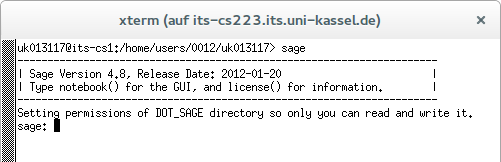
Working with Sage in the Linux cluster:
uk00123@its-cs1:/home/users/000/uk00123> salloc -N1 -t 1:00:00 |
This command reserves a machine in the Linux cluster for one hour and starts a shell window (xterm) on the reserved machine. The program is started in the shell window with the command sage .
Vampire
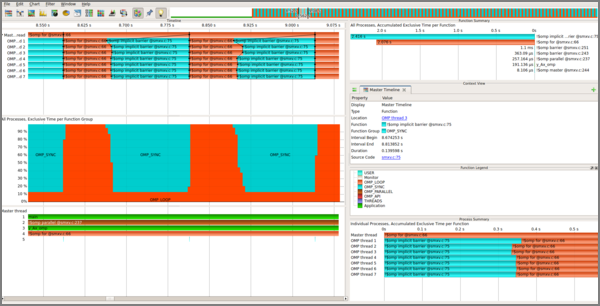
The Vampir Performance Analyzer provides a scalable way to analyze complex performance data within a graphical user interface. It visualizes the individual processes of parallel programs and how they communicate with one another.
- Version 9.2.0
- Official Website
This requires so-called trace files, which can be created using a wrapper compiler (mpicc-vt, mpic++-vt, mpicxx-vt, mpif77-vt, mpif90-vt, or mpifort-vt). After the program has been successfully compiled and executed, a trace file with the .otf extension is created. This file can be opened and analyzed with Vampir. An SSH connection with X11 forwarding to the cluster is required (ssh -X uk00123@its-cs136.its.uni-kassel.de).
Using Vampir on the Linux cluster:
| mpicc-vt -o hello_mpi hello_mpi.c mpirun -n 6 ./hello_mpi vampir hello_mpi.otf |
X10 Programming language
x10 is a strongly typed, object-oriented programming language under an open-source license. A Java or C++ source code is generated from the programs, which is compiled with the appropriate backend (Java compiler or GCC from version 4.2). The code of the C++ backend uses OpenMPI and can be executed directly with mpirun distributed.