

Mobility function
Mobility function - extended call forwarding
The mobility function allows you to forward calls to your business extension to another number without the destination number being visible. You can define times when you do not answer calls at work, such as when you are on business trips or working from home. This means you can always be reached without restricting your availability to a fixed workplace.
A one-off activation is required to use the Mobility function. You can apply conveniently using our online form. Please enter your business extension, the desired destination number and an optional schedule. After activation, you can adjust this schedule yourself at any time. This service is free of charge for you.
Editing the schedule
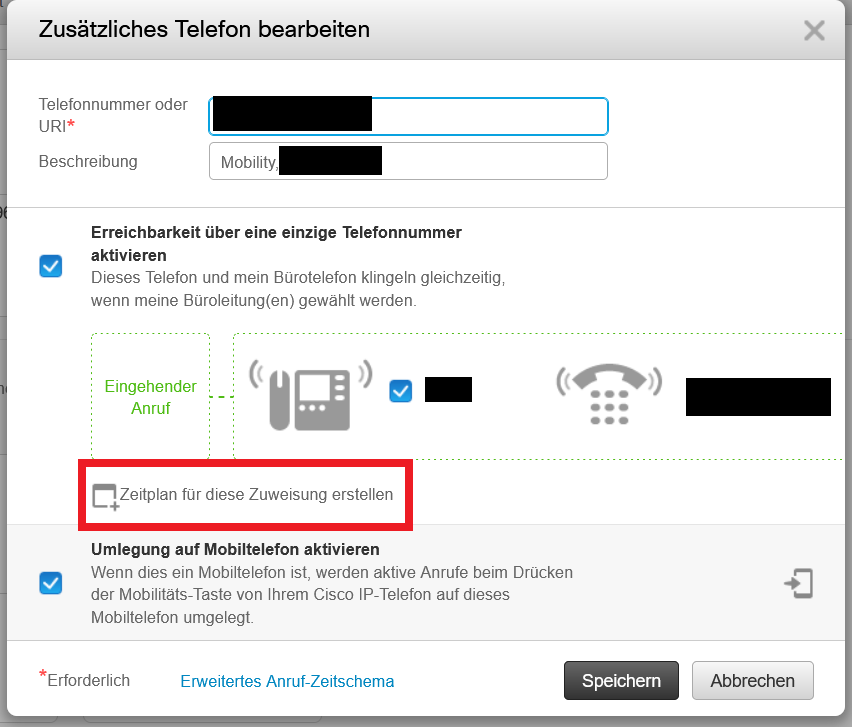
To adjust the schedule for call forwarding to your destination number, please log in with your UniAccount at<https://phone.its.uni-kassel.de>. Then click on "My phones" on the left-hand side. If the Mobility function has already been activated, you will see the corresponding entry under "Additional phones".

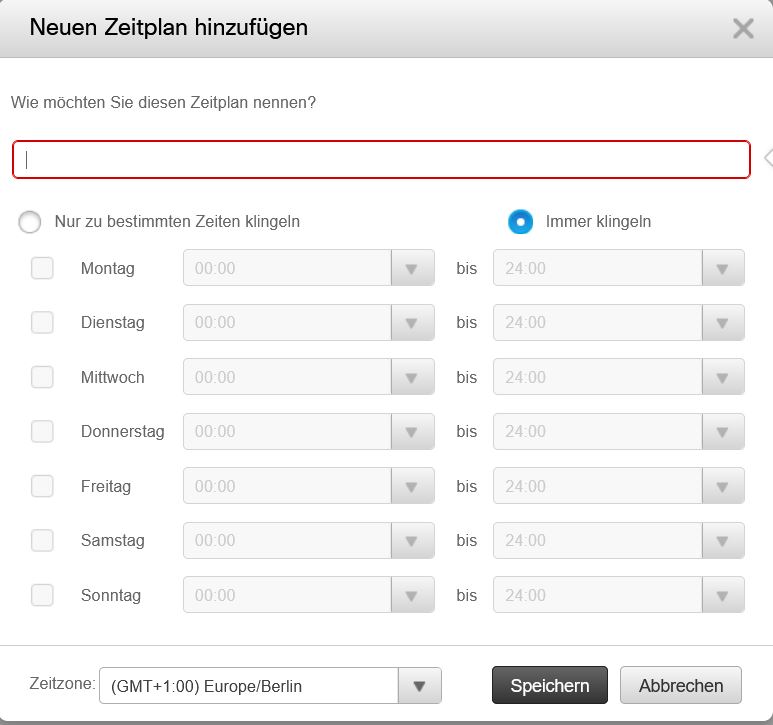
You can select "Edit" via the gear icon. Under the calendar icon next to "Create schedule for this assignment", you have the option of creating a new schedule. If a schedule already exists, you can edit it under the calendar icon next to the saved name.
Go-Link of this page: https://www.uni-kassel.de/go/mobility-funktion