

Main functions for ticket processing
The most frequently used functions are briefly described here. If you have any questions or require detailed explanations, please contact < tts-support[at]uni-kassel[dot]de >.
Once a ticket has been opened, you can return to the "View by queue" via "Back" (1.). Under "Communication" there is the option to create a note (2.).

A ticket can be closed via the "Close" button if, for example, no response is required (1.). A new window opens in which a text is required. Then click on "Submit".
Under "Miscellaneous", the following functions are among the most frequently used (2.):
- Lock: The ticket is locked for you. No other person can edit or reply to the ticket. To unlock a ticket, follow the same procedure again. The button is automatically changed to "Unlock", select it.
- Link: If two tickets have a similar topic, for example, or if you want to refer to another ticket, you can link them together. A link can be removed again.
- Combine: If there are two identical tickets, for example, they can be combined into one ticket. A combination can be removed again. If you click on the "Move" line (3.), a list of available queues opens, depending on the authorization. If you click on the desired queue, the ticket is moved directly to it. You can see which queue a ticket is currently in on the right under "Ticket information" (4.).

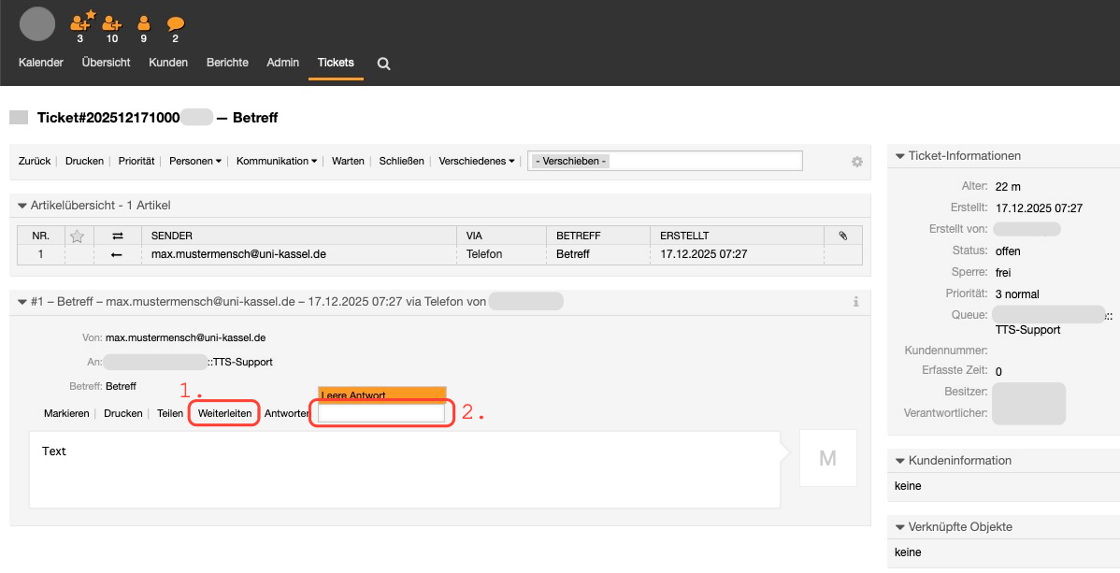
The ticket can be forwarded via "Forward" (1.). After clicking, a new window opens in which the receiving person and a corresponding text can be entered.
After clicking in the line next to "Reply", a list of stored reply templates opens. The "Blank reply" should always be available.
Go-Link of this page: https://www.uni-kassel.de/go/ticketbearbeitung