

Activation of automatic subtitles
A new function has been added to our Zoom instance.Automatic subtitles can now be used in Zoom meetings. These make it easier to understand spoken content and improve the accessibility of events.
Before activating automatic subtitles, please inform participants that spoken content will be automatically transcribed and displayed in the meeting.
Instructions
When planning a meeting, it is important that, unlike in the standard system, the "Extended/enhanced encryption" option is selected for the "Encryption" option, as only then can automatic subtitling work.
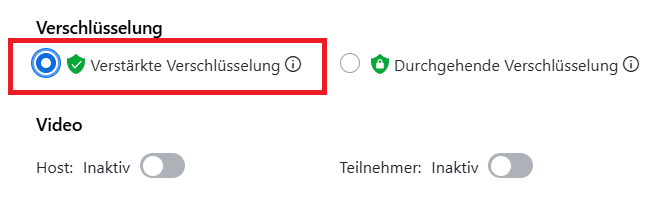
End-to-end encryption offers a significantly higher level of security than enhanced encryption. However, functions such as automatic subtitles would unfortunately not be possible with it. Therefore, please only switch down to enhanced encry ption for a video conference if you actually need these additional functions.
Hosts and co-hosts can activate the automatic subtitles in a meeting so that they are available to the participants. The corresponding option can be found in the bottom menu bar.
Other participants can use the same button to activate the automatic subtitles for themselves for this meeting, provided they have previously been activated by the host or co-host.

Go-Link of this page:https://www.uni-kassel.de/go/zoom-untertitel