

Integrate calendars from other users
The content on this page was translated automatically.
Contents
Include calendar (Windows)
In Outlook, you can integrate your colleagues' calendars or other calendars (e.g. rooms) to support your scheduling.
If you integrate several calendars, you can use calendar groups.
You will find an overview of your calendar groups on the left-hand side.

By default, the calendar group "My calendars" is available and contains your calendars.
If you now integrate another person's calendar, it will appear under "Shared calendars".
To do this, please click on "Open calendar" at the top and on "From address book".
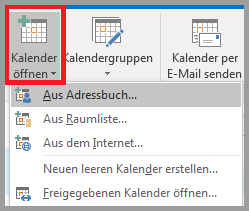
Now select the desired persons or resources.

The added calendar is then displayed under "Shared calendars".
Integrate calendar (Mac)
If you are in the calendar menu, please click on "Open shared calendar" in the "Start" tab.

Then enter the name of the desired user in the search mask.

Then click on "Open".
Unfortunately, adding groups does not work in Outlook for Mac.
The calendars then appear on the left under "Shared calendars".
