

Module plan (new function)
You can find the study planner here: Menu > My studies > Module plan
Overview
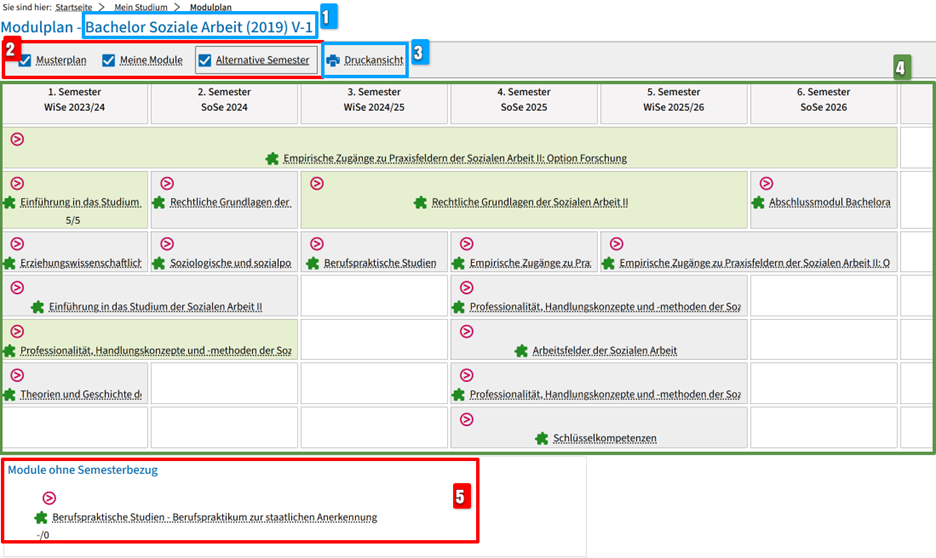
Here you can see:
(1) the name of the degree program plus the version of the examination regulations (year),
(2) the display control
Select what you want to display in the module plan by ticking the appropriate boxes:
- Only Sample plan Checked: Display the modules in the semester in which they are scheduled according to the examination regulations (PO). Please note: If the department has not specified a recommended semester for a module, it will not appear in the plan, but under "Modules without semester reference" (number 5).
- Only My modules ticked: Display of modules that you have already started or completed or that you have marked for certain semesters in the module plan
- Alternative semesters show in which semester a module is recommended as an alternative (similar to sample plan)
- If you combine several checkmarks, the plan changes accordingly with
(3) A button to call up the print view
(4) a module plan
(5) an area in which modules are displayed that have not yet been assigned a semester.
You can expand/collapse each module listed using the small pink circle with the arrow symbol:
- show or hide the elements of the module, i.e. examinations, coursework and courses (to the symbol overview),
- see how many of the expected ECTS points you have already earned, e.g. -/6,
- click on the module title to view your current status and the semester in which the module was passed or to view further details about the module.
When the module is expanded, you can click on the title of the associated examinations/study achievements or courses and obtain further information or carry out actions if necessary.
You can in the module plan:
- register for courses during the registration period or cancel your registration
- register for examinations and coursework and/or cancel your registration within the withdrawal period,
- view the status of a course, examination or coursework,
- reserve the course, examination or coursework in the module plan for a later semester in order to plan your course of study or remove a reservation again
- Expand module > Click on course, examination or course management > Add to module plan / Remove from module plan
Please note that this is neither the submission of a document request nor a reservation for the timetable!
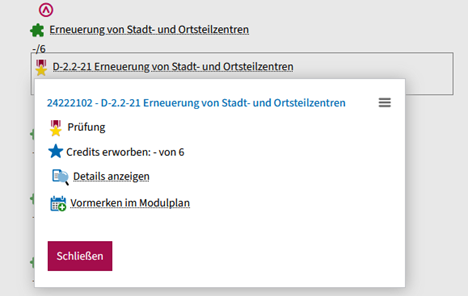
- call up the detailed pages for events, examinations or academic achievements and make a note of them in your timetable from here
We have created a video tutorial for the module planner here. Here you can see how to navigate to the module planner and how you can use it to plan your semester.
You can also find the English version of the tutorial here.
Go-Link
Go-Link of this page: https://www.uni-kassel.de/go/ecampus-modulplan