

Mailing list application under Sympa
Contents
General
On this page you will find everything you need to know about applying for and setting up mailing lists.
Please note: This service (setting up and maintaining mailing lists) is only available to members (staff and students) of the University of Kassel!
Prerequisites
The topic of the list should be clearly related to the university, its facilities, research or teaching. This naturally also includes lists on which student issues are discussed.
At least one person in charge should document their affiliation to the university by means of a university account (with an e-mail address of the University of Kassel).
The name of a mailing list should correspond to our naming convention:
- A short but unique name, usually consisting of two parts connected by a hyphen.
- The first part should give an indication of the overarching institution in the form of an abbreviation.
- The second part should contain the more specific name.
Example: its-news, DGfE-gsf, Umweltpsychologie-Doktoranden
Type of mailing list
Depending on the intended use, we will set up the desired mailing list with a standard configuration that is sufficient in most cases. You can also change all configurations again once they have been set up. Further information can be found in the article Mail list administration.
Each list can only ever have one purpose! If you require several lists, please submit several requests. Each request must contain an individual list name!
Would you like to regularly send information and news to a group of interested parties? The easiest way to do this is with a newsletter. A newsletter is characterized by the fact that e-mails are sent from one or a few e-mail addresses to a large group of recipients. A discussion about the topics of these mails does not take place on the mailing list. In general, the group of recipients of these mails is not restricted. Only a small group of defined persons may send messages to the registered participants.
Do you need a "real" mailing list in which all subscribers (possibly under the supervision of a moderator) can discuss a specific topic? Then the public discussion list is just right for you! This type of mailing list is open to everyone and the possibly existing archive can be set so that it is not only visible to subscribers, but also accessible to non-subscribers (e.g. so that contributions to the list can be found via search engines).
Requesting a mailing list
If you would like to apply for a new mailing list, go to the following page < https://lists.its.uni-kassel.de >.
Click on the "Login" option at the top right and then enter your UniAccount <ukxxxxxxxx> in the "Email address" field in the login screen.
Then enter the corresponding password and click on "Go" to complete the registration process.

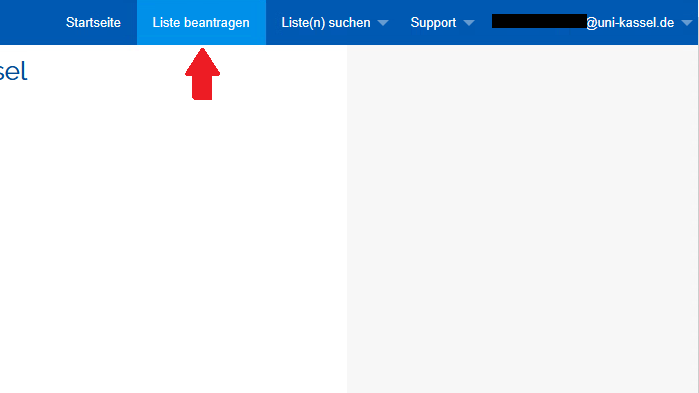
If you have successfully logged in, you will be automatically redirected to the start page. Now click on the "Request list" option at the top right.
Enter the desired list name < e.g. its-info > and select one of the following list types:
- For a newsletter, select the type "List configuration for a 'Newsletter' with plain text and HTML".
- For a discussion list, please select the list type "public discussion list".

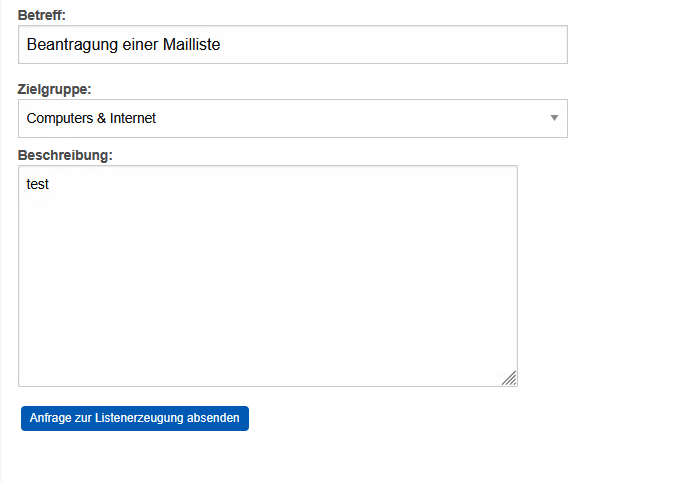
Enter Request for a new mailing list in the "Subject" field and select the relevant target group < e.g. Computers & Internet >.
Then fill in the "Description" field with a brief description of the mailing list or the topic and purpose of the mailing list < e.g. test >.
Send the request by finally clicking on "Send request for list generation".
Go-Link for this page: https://www.uni-kassel.de/go/maillisten-beantragung-sympa and https://www.uni-kassel.de/go/maillisten-beantragung