

Instructions for connecting network drives (UKC)
These instructions only apply to users who use a UKC device. You can find an explanation of how to determine this under UniKasselClient (UKC).
First, click on the "File Explorer" (folder icon in the lower taskbar). Click on the "Computer" tab at the top.
Then click on "Connect network drive".

A new window will open again. Now proceed as follows:
Select an unused letter as the drive (e.g. "Y"). Enter the folder: \\smb.uni-kassel.de\YourUniAccount or \\smb.uni-kassel.de\NamedesNetzlaufwerk
If you work in the university administration, your home drive and department drive are usually connected automatically. If you want to connect another network drive, the path is \\smb-verw.its.uni-kassel.de\NamedesNetzlaufwerk
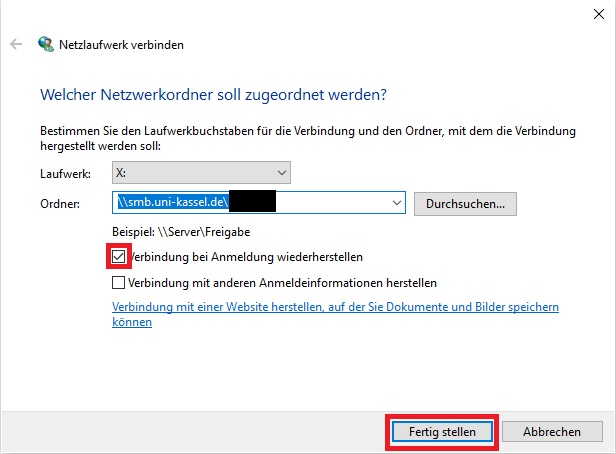
Check the box next to "Reconnect on login". Do not check the "Connect with other login information" box. Then click on "Finish".
The drive should now be mounted.
Go-Link of this page:https://www.uni-kassel.de/go/netzlaufwerk-ukc