

eduroam under Linux
The content on this page was translated automatically.
On this page you will learn how to integrate the eduroam WLAN manually under Linux.
To configure network connections on mobile devices, Linux offers the "NetworkManager", which many distributions already use by default. The "NetworkManager" settings are configured using the command line or graphical applets - a typical example is the "nm-applet":
You need three certificates for the secure connection with the eduroam. These are available as a certificate chain. Save the chain as a .pem file.
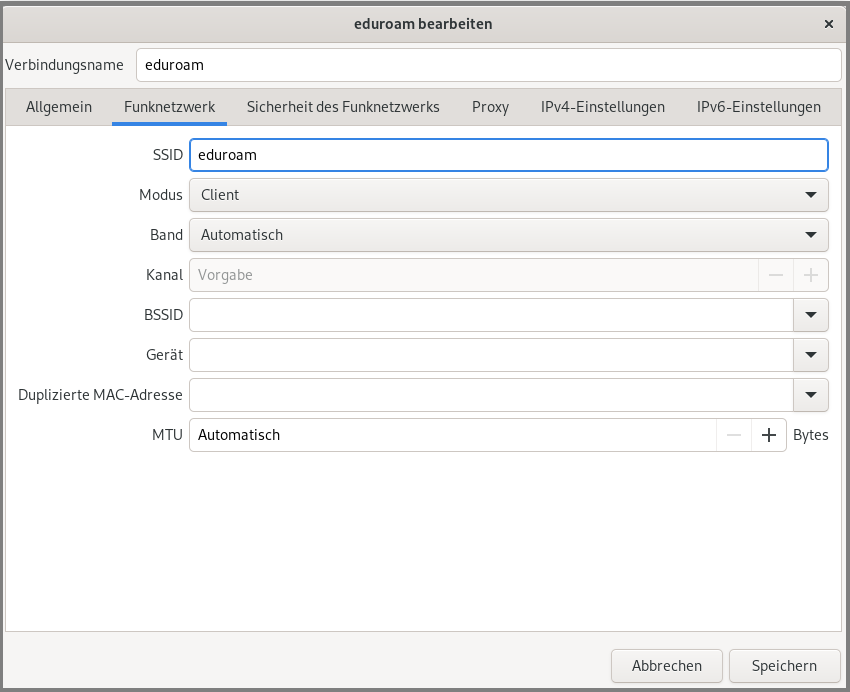
Create a new connection of type "Wireless network" and enter "eduroam" as the SSID in "Client" mode.
Make the following settings under "Wireless network security":
- Security: WPA/WPA2 Enterprise
- Authentication: protected EAP (EAP)
- Anonymous identity: anonymous@uni-kassel.de
- Domain: uni-kassel.de
- CA certificate: Select the downloaded certificate chain here.
- PEAP version: Automatic
- Internal legitimization: MSCHAPv2
- User name: IhrUniAccount@uni-kassel.de (e.g. uk012345@uni-kassel.de)
- Password: YourUniAccountPassword
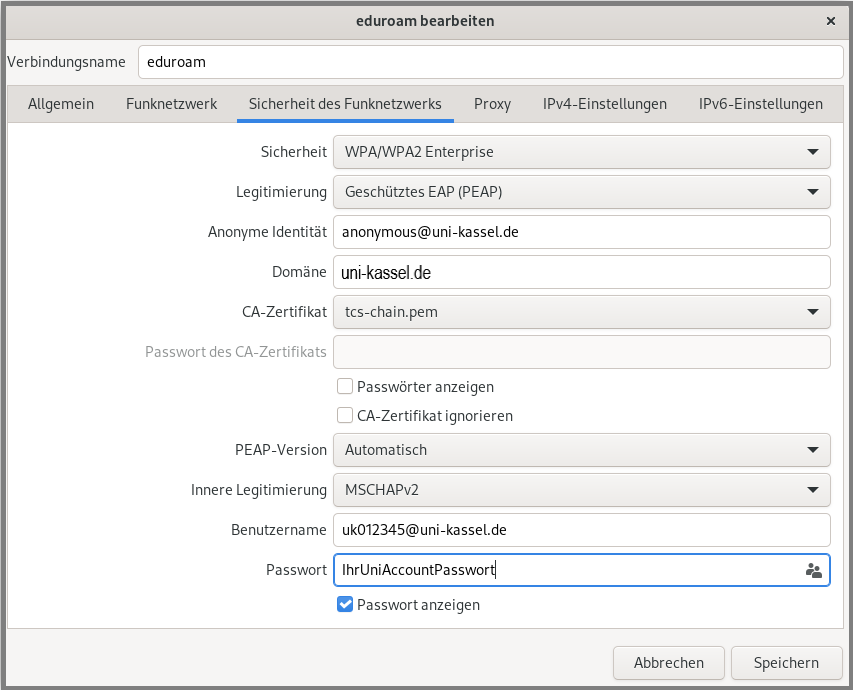
The settings shown can also be used 1:1 for other applets (e.g. "KNetworkManager") or the command line.
Go-Link of this page: www.uni-kassel.de/go/eduroam-linux