Alternative moderators
The content on this page was translated automatically.
What are alternative moderators?
When planning an event, it is possible to enter people as alternative moderators. This function can be useful, for example, if you are represented by another person.
Alternative moderators have the following authorizations:
- start the meeting (the person is given the host role in the event)
- Skip the waiting room
- Automatic co-host role in the event
The person creating the event can claim the host role in the event, even if an alternative moderator has opened the event and is therefore initially assigned the host role.
Note on adding the alternative moderator: The alternative moderator can only be added if the person has a corresponding Zoom license and was already registered in the instance. To add a collaborating person as an alternative moderator, use the person's email address in the format <ukxxxxxx@uni-kassel.de>. For students, please use the format <ukxxxxxx@student.uni-kassel.de>.
How do I create the alternative moderator?
- before the meeting:
- To add a person as an alternative moderator, the person's email address is required, which is also used for Zoom.
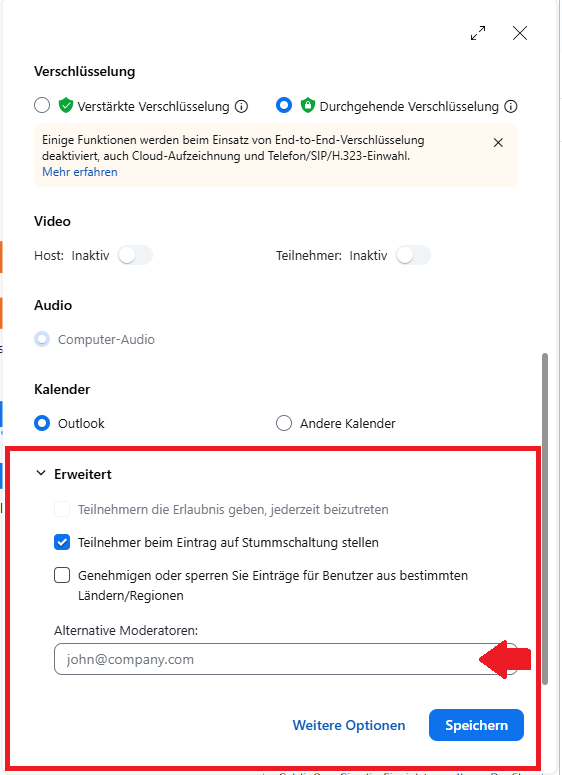
- When planning a meeting, scroll down and add the email addresses under "Alternative moderators" in "Advanced options".
- during the meeting:
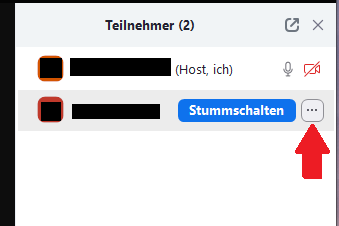
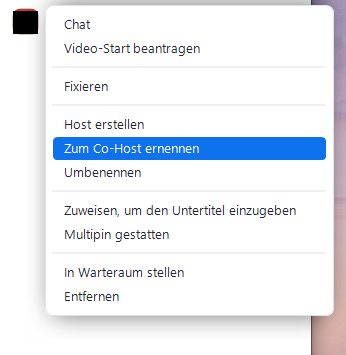
- select the participant you want to make a co-host
- click on "Rename to co-host" via the three-dot icon