

Guest accounts
Contents
General information
Guest accounts offer the opportunity to access central IT services of the university, such as WLAN and an e-mail inbox, at short notice and without applying for an account.
It is possible to apply for such an account via Identity Management. This function is only available to employees.
Information on the provision of WLAN access for conferences can be found on the Conference WLAN page.
Guest account
A guest account is intended for a person outside the university who is a guest of the university in the sense of teaching and research, i.e. who is directly connected to the university. Please note that this type of account is expressly not intended for external companies, tenants of the Studierendenwerk or users of the University of Applied Sciences, for example.
A guest account can be requested for a maximum of four weeks.
If you need an account with a longer duration, please use the form"Application for UniAccount" and follow the instructions for the account application (section "Guests and lecturers").
Account application via the IDM
To apply for a temporary account via identity management, please register at
https://uni-kassel.de/go/userapp
with the user name and password of your primary account and accept the IT user regulations by ticking the appropriate box.
Then click on "Request access".
Scroll down to the other functions and click on "Request new account".


If nothing happens after this action, your web browser is probably blocking the pop-up window that was supposed to open. Please make sure that your web browser allows the opening of pop-up windows for userapp.uni-kassel.de.
In Mozilla Firefox, for example, you will see a message and an option to allow the pop-up window directly below the address bar.
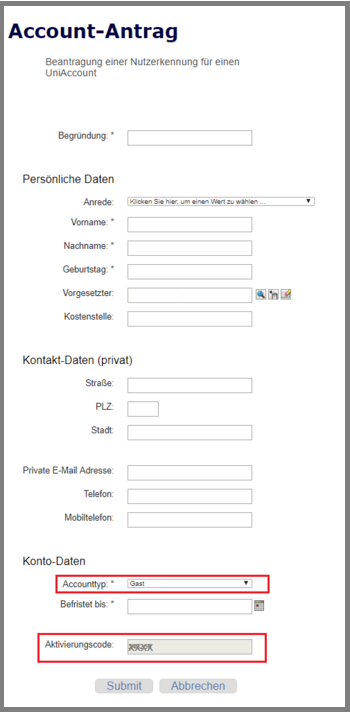
A new window will open. Enter the requested data.
For example, you can enter "Guest account" as the reason
Enter the guest's personal details.
The first name, surname and date of birth will be required later for account activation.
You can enter your service address in the "Contact details (private)" category.
Please select the "Guest" option in the "Account type" category. Please note that guest accounts can be requested for a maximum of four weeks.
If the account is still required after this time, please use the extension request.
Please make a note of the automatically generated activation code and then click on "Send".
Activation
Once your application has been processed, you will receive an e-mail asking you to activate your account. This requires your first and last name, date of birth and the activation code. Activation takes place via
https://www.uni-kassel.de/go/activate
There are video instructions for activating the account.
Go-Link of this page: www.uni-kassel.de/go/gastaccount