

UniAccount
Contents
How do I get my UniAccount?
To use the university’s IT services, you need a UniAccount. How you obtain your UniAccount depends on which group you belong to.
Students, Employees, and other members of the University of Kassel
Students need a student ID number for the activation process; employees need a personnel number (SAP). Individuals who do not fall into any of the categories listed above and need a UniAccount will be sent an activation code.
This process is described here: “Activation”
Do you have an initial password instead of an activation code? If so, please refer to the documentation under the section “For Other Members of the University.”
Adult Education Center (formerly UniCard)
If you would like to register with the Adult Education Center, please contact UniKasselTransfer (UKT). You can also obtain your UniAccount there.
You can find more information on the Adult Education Center’s website.
Other University Affiliates
In order for you to receive a UniAccount as a guest or adjunct instructor (without a personnel number), a university employee must first submit an account request on your behalf. To do so, please fill out the“UniAccount Request”form and send it to:
University of Kassel
IT Service Center
Mönchebergstraße 11
34109 Kassel
Please fill out the form completely. It must be signed by both individuals. Also include your position (for example, adjunct professor). You will receive your login information by mail or email once your application has been processed. After that, all you need to do is activate your UniAccount.
Change password
Before you change your password, please read the tips on password security.
All passwords expire after 180 days. They must be renewed before they expire. Passwords are maintained in Identity Management (IDM ). Each user receives a total of five e-mails informing them that their password is about to expire. After these 180 days, six grace logins are still available to change a password. When logging in to services of the University of Kassel (portal, Moodle or WLAN/VPN), one grace login will be deducted in each case. At the end of these periods, no more logins are possible. Once you have used up all your grace logins, please call the following telephone number: +49 561 804 - 5678.
You can change your password as follows:
- Log in to IDM with your UniAccount and the corresponding password.
From now on, it is necessary to give your consent to the IT user regulations by ticking the relevant box.
If you would like to set a new password from home and it is not possible, please dial into the university network via the VPN connection and set a new password.
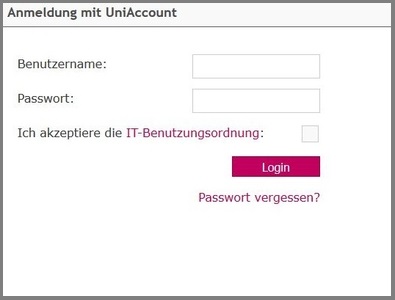 Image: University of Kassel
Please click on "Change password".

A new window will open. You will be asked for your "current password". Please enter it and click on "Next".
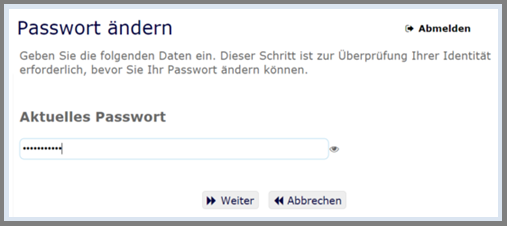 Image: University of Kassel
Now you can create your new password according to the guidelines described above. Confirm the new password again and click on "Change password".
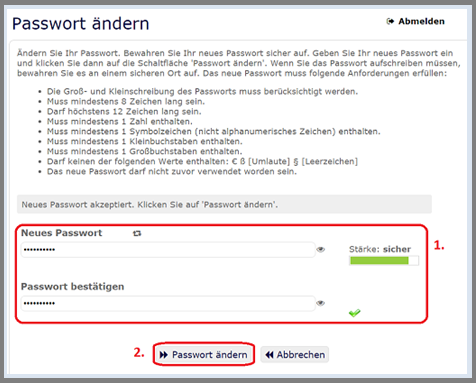 Image: University of Kassel
It may take a few minutes to change the password.
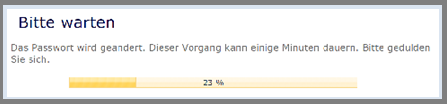 Image: University of Kassel
Your password has been successfully changed.
Click on "Continue" and you will be redirected to the start page.
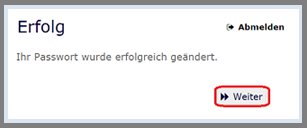 Image: University of Kassel
The new password is effective immediately for (almost) all services. For technical reasons, the transfer of the new password to the mail service and network drives (Samba) may be delayed by up to 90 minutes.
Forgotten your password?
If you have forgotten your password, please contact our IT helpdesk:
Mönchebergstraße 11, Room 1740A
Monday-Friday: 8 a.m. to 7 p.m.
Alternatively, you can reset your password yourself. The prerequisite for this is that you have previously entered your mobile phone number in your IDM profile.
You can find more information on this under the following link:"Password reset in self-service"
Renewal application
Have you received a notification that your UniAccount is about to expire, but you still need it? Apply for an extension using the new application form. However, tick "Extension" and don't forget to enter your user ID.
Your application will be processed within a few days. As a rule, you will not receive any notification once your application has been processed. You can check whether your application has been processed by entering the duration of the account in the user application.
Please ensure that the signature of the person responsible for the cost center is present.
The extension request does not apply to secondary accounts, which can/must be "extended" differently. You can find more information on this under Secondary accounts.
Delete or transfer UniAccount
Most UniAccounts are automatically deleted according to set rules. This applies primarily to students’ UniAccounts. However, if—for whatever reason—you have one or more UniAccounts that you no longer need (e.g., functional accounts), there is a formal procedure for transferring these UniAccounts to another person or having them deleted.
You would like to have a UniAccount deleted
When a UniAccount is deleted, this also applies to all data associated with it: emails, email addresses, web pages, files stored in the HOME file system, etc.
To initiate the deletion, please submit the completed and signed form for deleting a UniAccount to the ITS,
IT Service Center, University of Kassel
Mönchebergstraße 11
34109 Kassel
. You will be notified of the deletion via email if you have provided an email address that is independent of the UniAccount to be deleted.
You would like to transfer a UniAccount to another person
If you would like to have a UniAccount transferred to another person—for example, because one of your official duties has been transferred to that person—please submit the completed form for transferring a UniAccount, signed by both parties involved, to the ITS:
IT Service Center, University of Kassel
Mönchebergstraße 11
34109 Kassel
Services that can be used with the UniAccount
Below you will find a list of the standard services that you can use with your UniAccount:
- WLAN and VPN at the university
- Storage space on the server
- eLearning Moodle
- Blackboard
- Linux cluster (scientific computing)
- CONVERIS research information system
- Academic management information system AKADEMIS
Students can also benefit from the following services:
- Event and examination administration (HIS LSF and POS)
- Internet access in the student residences