

Group mailbox OWA
The content on this page was translated automatically.
Before you can set up a group mailbox, please apply for a group mailbox with an associated e-mail address via IDM.
Please follow the instructions for applying for a group mailbox.
Log in with an account that is activated for the group mailbox at the address <mail.uni-kassel.de>.
In this case, the user name is only the user ID <ukxxxxxx> and not the entire e-mail address.
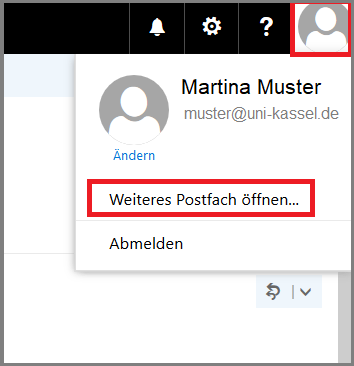
After logging in, click on your profile in the top right-hand corner and select "Open another mailbox".
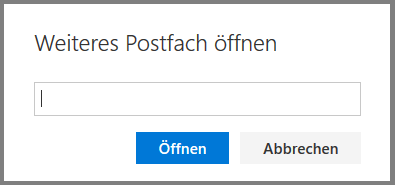
Then enter the relevant e-mail address or a keyword in the search field.
Select the desired group mailbox from the search results. The mailbox will then open in a new tab in your browser.
Please note that, in contrast to the procedure in the desktop app, the group mailbox cannot be permanently integrated here, but must be opened again after closing the browser using the method described above.
Error message "You are not authorized to open this mailbox."
If you receive the error message "You are not authorized to open this mailbox" after the new browser tab has opened, your account is not activated for the group mailbox.
In this case, please check whether you have used the correct account when logging into OWA and contact the person who administers the group mailbox.

Go-Link of this page:https://www.uni-kassel.de/go/gruppenpostfach-owa