

WindWarte / Immediate approval
The content on this page was translated automatically.
Contents
With the "WindWarte", the registration procedure with immediate admission, participants are admitted immediately after registration. Once the maximum number of participants has been reached, you can be placed on the waiting list. If an admitted participant cancels, the next person on the waiting list automatically moves up.
Attending a course without parallel groups
Click on "book/deregister" for the desired event.

After clicking on "Apply for a place", the confirmation will appear. You will be admitted immediately.

Entry in the waiting list for an event without parallel groups
If all places for the event are taken, you can enter your name on the waiting list. If a participant who has already been admitted releases their place, the next person on the waiting list will automatically move up. You will not be notified by e-mail!

The confirmation means that you have a place on the waiting list. Unfortunately, the place you are on the waiting list is not displayed.

Control of occupancy
There are various ways to find out about your own assignments. "My functions / Timetable"
The "ZU" means that you have been admitted to this event.

The "WL" means that you are on the waiting list for this event.

Attending a course with parallel groups
Click on "book/deregister" for the desired event. In our example, places are available in all groups. The 1st group is selected by default! As the 2nd group is to be booked, you must first click in the circle after the group name. Then click on the "Request place" button.

You will receive a confirmation and will be admitted immediately.
Entry on one or more waiting list(s) for an event with parallel groups
If one or more groups are already full, you can register here on the waiting list. If a participant who has already been admitted releases their place, the next person on the waiting list will automatically move up. If this participant is on the waiting list for several groups, the other entries will be deleted. No notification will be sent by e-mail!
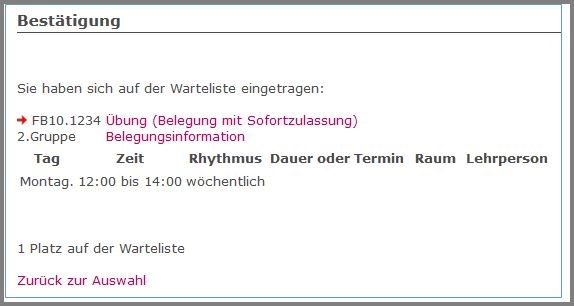
If you have clicked on "Add to waiting list" for a full group, you will receive the following confirmation:
The confirmation means that you have a place on the waiting list. Unfortunately, the place you are on the waiting list is not displayed. You can register for as many waiting lists for the event as you like, even though there are still places available in one group.

If you want to take the free place in the 4th group later, after you already have a waiting list place, you must first deregister from the waiting lists for groups 1 to 3.
The "Apply for a place" button will only appear after you have deregistered.

Control of occupancy
There are various ways to find out about your own assignments.
"My functions / Timetable"
The "ZU" means that you have been admitted to the 2nd group for this event. Here you were entered on the waiting lists for groups 1 and 2.

The "WL" means that you are on the waiting list for this event in groups 1 and 2.

Moving up from the waiting list
Someone has canceled their admission. You move from the waiting list to a free place and are admitted. Unfortunately, you will not be notified in this case.

You have been admitted to group 2 for this event. The waiting list entry for group 1 has been automatically canceled.
