

Adobe Stock Image Database
This page contains automatically translated content.
Since October 2022, many German universities have a new framework agreement for Adobe software. This includes the possibility for employees to use free images from the Adobe stock image database.
1.IDM Freigabe
To access the Adobe stock image database, you must first activate the Adobe package in the IDM of the University of Kassel.
- log in to the IDM
- Select the Access tab
- Then click on "Access to Adobe CC & Acrobat"
2.Adobe Login
Go to the Adobe Stock website and log in with your university account:
- https://stock.adobe.com/de/
- Login at the top right of the screen
- You will automatically be redirected to the UK login
3.Search
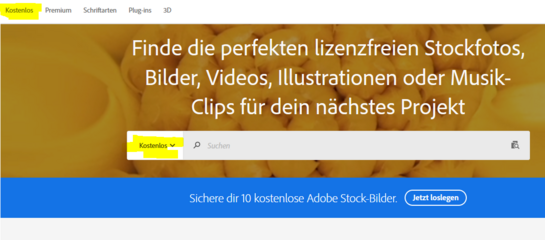
Before the image search, the Free tab must be selected. You can now search for keywords in the search bar.
4.Download

- Select image
- Copy the copyright next to the image
- Click on the License free of charge button to start the download.
- Give copyright and Adobe Stock credit when using the image (Photo: Photographer / Adobe Stock)
- Downloaded images are displayed under "My Libraries" in the top right-hand corner of the screen.