

Typo3 Access and Training

The content on this page was translated automatically.

Go-Link for this page: www.uni-kassel.de/go/typo3-account
New Rules Effective in 2027

Dear Colleagues,

Our digital presence is the university’s calling card. To ensure that the quality, IT security, accessibility, and legal compliance of our websites remain at the highest level over the long term, we will be changing the way we assign accounts and organize training starting in 2027.

What’s changing, and why?

Until now, account assignment has been unregulated and training sessions open to all. This led to an enormous number of accounts that had become nearly impossible to manage. To streamline these processes and make them more secure, we are taking a new approach:

  • Account Assignment: The number of Typo3 accounts will be strictly limited in the future. Access will only be granted on a highly targeted basis to individuals who work intensively and regularly in the web department.
  • Proven Qualifications: In the future, an account will require successful completion of a training course.
  • Flexible Learning via Moodle: We’re moving away from traditional in-person training and offering you a self-paced learning program through Moodle.
  • Simpler Usage: Depending on the qualifications you’ve earned, you’ll have corresponding permissions in Typo3. You’ll only see the features you actually need.

We sincerely thank you for your understanding, your support, and your daily commitment to our university as we embark on this new path.


Principles for Assigning Accounts

TYPO3 accounts are only issued to individuals who regularly perform editorial tasks and require personal access for that purpose. Before submitting a request, you must verify whether the tasks can be handled by individuals who already have access.

As a general rule: as few accounts as possible, as many as necessary.


Requirements for a TYPO3 Account

  • An account will only be granted if a specific official need is demonstrated.
  • The responsible department or unit, in consultation with the central online editorial team, determines whether the requirements for personal access are met.
  • An account is granted for specific tasks. If these tasks are no longer being performed, access privileges are revoked. To ensure that access is granted only for as long as necessary, accounts are generally granted for a limited time, and the need for them is reviewed regularly.
  • Unused account slots do not have to be assigned.
  • A particularly urgent need does not automatically override the applicable quota limits. Exceptions must be expressly approved.

Maximum Account Quotas

The following quotas specify the maximum number of accounts that may be allocated. They do not represent target figures and do not constitute a right to utilize the full quota. It is expressly encouraged to remain below the upper limits.

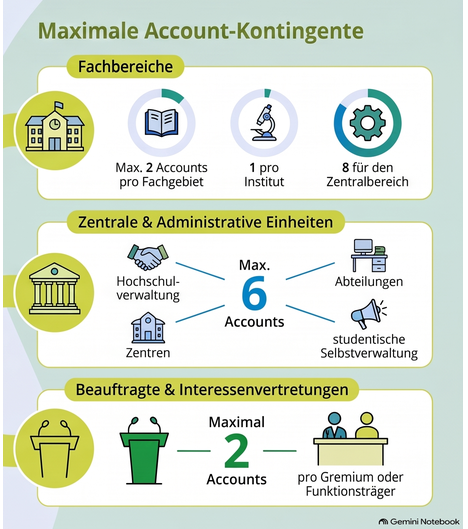
The following upper limits apply to the various organizational units:

  • Academic departments: up to two accounts per discipline, one account per institute, and up to eight accounts for the central administration.
  • Central units, scientific centers, research and competence centers, departments, and administrative offices of the university administration, as well as the student government: up to six accounts each.
  • Appointees and interest groups: up to two accounts per committee or officeholder.

Even within these quotas, the goal remains to limit the number of accounts to what is actually necessary.

(opens enlarged image)

Quota Allocation for 2027:

DepartmentNumber
Institutes/Research Units
Number of
Departments + Disciplines
Available Accounts
Institutes
Available Accounts
Fields of Study + Subjects
Accounts
Total
Department 0144749498
FB 02632 + 1664 + 171
FB 05433 + 1466 + 171
FB 0633336669
FB 07441 + 1482 + 187
FB 10447 + 1494 + 199
FB 11327 + 1354 + 158
FB 1451953843
FB 1572575057
FB 1622525052
Total3733242658 + 5705

Assignment and Activation

If the technical requirements are met and a spot is available in the centrally managed account quota, the online editorial team will confirm the individual’s eligibility for access.

The person in question will then have the opportunity to reserve a spot in the mandatory TYPO3 e-learning training course.

The account will not be activated until the training—including the exam—has been successfully completed. The online editorial team will set up access and grant permission to use the account.

Detailed Procedure:

(opens enlarged image)

Note

  1. Before registering, please check whether you have a realistic chance of obtaining a TYPO3 account. Only a limited number ofnew accounts are issued, typically through a waiting list process.
  2. A prerequisite for a TYPO3 account is the successful completion of an e-learning course. You have three weeks to complete the course (the time required varies by individual—based on experience, the basic course takes approximately 8–10 hours in total). In the fourth week, we’ll make an exam available; successfully completing it will result in a certificate of participation. Training sessions start monthly. Please note:
    • An extension of the training period is not possible.
    • If your enrollment is canceled or you do not complete the course by the deadline, you must reapply for an available training spot. Automatic rollover to the following month is not permitted.

Here you can submit a request for TYPO3 access, including the required training: Application Form


To be promoted to a higher permission level , you must successfully complete the Moodle course “Advanced Editing.” Details and the application process can be found in the Moodle course.